Printed Postcards

$15.24

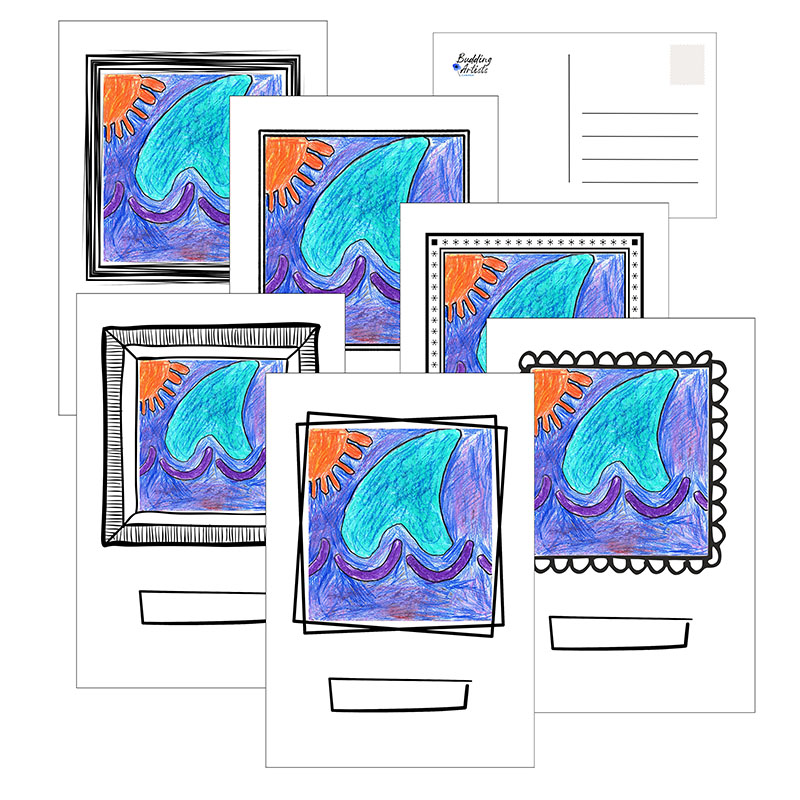
Lot de 12 cartes postales imprimรฉes avec le chef-d’ล“uvre de votre enfant au recto et des lignes pour รฉcrire au verso. Deux exemplaires de chacun des 6 modรจles diffรฉrents.
Indiquez un nom, une annรฉe ou un titre dans la case situรฉe sous l’illustration.

12,7 cm x 17,8 cm, papier cartonnรฉ 100 lb


Set of 12 postcards printed with your child’s masterpiece on one side, and postcard lines on the backside. Two of each 6 different designs.
Enter a name, year or title in the box under the artwork.

5″x7″ 100lb cardstock

Instructions

  1. Modifiez la quantitรฉ ci-dessous si vous le souhaitez (la valeur par dรฉfaut est 1).
  2. Cliquez sur le bouton orange ยซ Enter Name and Art Code ยป ci-dessous.
  3. Le code dโ€™artistique sโ€™affichera lorsque vous cliquerez sur le champ prรฉvu ร  cet effet. Entrez le nom de l’artiste.
  4. Cliquez sur le bouton bleu ยซ Refresh Preview ยป si votre illustration nโ€™apparaรฎt pas sur lโ€™image. Lโ€™aperรงu devrait sโ€™actualiser automatiquement une fois que vous aurez saisi le nom de lโ€™artiste.
  5. Cliquez sur le bouton vert ยซ Approve & Continue ยป pour ajouter lโ€™affiche ร  votre panier, puis attendez le message de confirmation indiquant quโ€™elle a bien รฉtรฉ ajoutรฉe.
  6. Vous verrez ร  nouveau cette page. La suite dรฉpendra de ce que vous souhaitez faire maintenantโ€ฆ Dรฉcouvrez les options ci-dessous.

OPTION A : Cliquez sur le bouton blanc et bleu ยซ Continue Shopping ยป ci-dessous pour revenir ร  la page d’achat.
REMARQUE : Pour commander des produits avec un code d’illustration diffรฉrent, retournez ร  la page d’achat et faites dรฉfiler vers le haut jusqu’ร  la case ART CODE. Saisissez le code d’illustration souhaitรฉ, puis cliquez sur ยซ Verify ยป.

OPTION B : Une fois que vous avez ajoutรฉ tous les produits souhaitรฉs, cliquez sur le bouton ยซ View Cart ยป ci-dessus, vรฉrifiez votre commande et passez ร  la caisse.

Ordering Instructions

  1. Alter the quantity below, if desired (default is 1).
  2. Click on the orange ”Enter Name and Art Code” button below.
  3. The art code will appear when you click on the art code box. Enter your artist’s name.
  4. Click on the blue “Refresh Preview” button if you do not see your artwork on the image. It should automatically refresh after you enter the artist’s name.
  5. Click on the green “Approve & Continue” button to add the product(s) to your cart and wait for the confirmation message that it has been added.
  6. You will see this page again - depending on what you want to do next, will determine your next step... see your options below.

OPTION A: Click on the white/blue “Continue Shopping” button below to return to the shopping page.
NOTE: To order products with a different art code, return to the shopping page and scroll up to find the ART CODE box. Enter the different art code and click “Verify”.

OPTION B: When you are done adding all the products you want, click on the “View Cart” button above, review and proceed to checkout.

Drop Files To Upload Documents
Continue Shopping
  Ask a Question
SKU: APP-ELA Categories: , ,

Description

set of 12, 5″ x 7″ 100lb cardstock

Reviews

There are no reviews yet

Only logged in customers who have purchased this product may leave a review.